
Check the player before choosing an action
- Run
/staffpanel, locate the player in Inmate Directory, and open their head. Page forward if needed. - Read the Case File title and hover the player head. Check the exact username, player identifier (UUID), online status, and last-seen information. Use the identifier to distinguish similar names.
- Choose Refresh player details if the player just joined or left. An online overview can show world, game mode, prison rank, and balances. An offline file does not provide live balances.
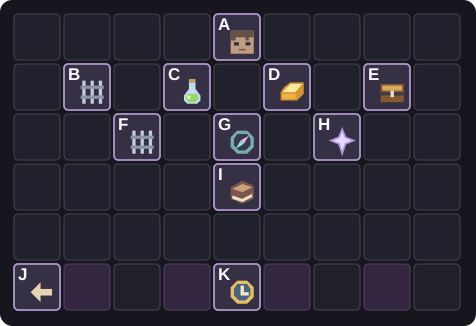
- Row 1: A · Player head and overview.
- Row 2: B · Discipline & history, C · Change prison rank, D · Give money, E · Give kit.
- Row 3: F · Jail / release, G · Parkour checkpoints, H · Reward multipliers.
- Row 4: I · Current staff adjustments.
- Bottom row: J · Back to the Inmate Directory, K · Refresh player details.
Find the relevant history
Open Discipline & history and then Disciplinary History. Records show their reference, type, reason, issuer, issue time, end time where applicable, and status. Check whether an older record is active, expired, or revoked before deciding whether it applies to this incident. Help & Reports contains saved requests and reports when your account can view them.
For checkpoint and reward questions, check Current staff adjustments on the case-file overview. An existing multiplier or saved checkpoint policy can explain a result without changing the player’s settings.
Read the last screen
For a case-file adjustment, compare the target, action, amount or setting, and expected result on the confirmation screen. Confirmations for these adjustments expire after 30 seconds. A private chat prompt for a custom value ends after 60 seconds and accepts cancel. If the input expires, reopen the player’s case file and review the current state.
If the server reports an unconfirmed save, refresh the record before retrying. A second grant could pay twice. If the target is offline, busy, or has changed rank since the preview, use a fresh overview and pass on the exact message if you need help.